Control Axiom Chart Plotters Remotely With Versatile Mounting Options
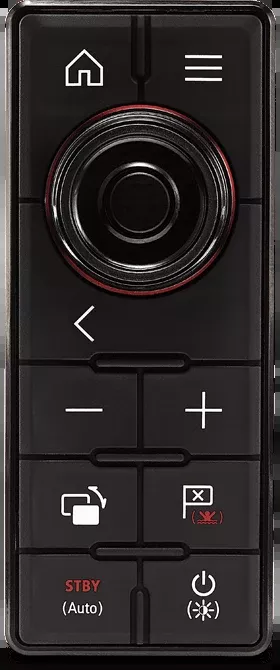
The Raymarine Multi Function Display Keyboard RMK-10 is designed for efficient remote control of Axiom chartplotter displays, making it suitable for installations beyond arm’s reach or in overhead electronics boxes. This wired keyboard can be either surface-mounted or flush-mounted, providing flexibility in installation with options for both portrait and landscape orientations. The RMK-10 is compatible with the entire Axiom range, ensuring seamless integration with your existing setup.
Constructed to withstand harsh marine environments, the RMK-10 features an IPX6 and IPX7 waterproof rating, ensuring reliable performance even in wet conditions. This durability is complemented by the inclusion of essential mounting hardware, a keypad mat, a mounting gasket, a power cable, and a network cable, making installation straightforward and efficient. The robust design of the RMK-10 ensures a longer lifespan, providing consistent control over your chartplotter displays for years to come.
Features
- Provides Full Control Of The Axiom Range Of Chartplotters From Any Mounting Location
- IPX6 And IPX7 Waterproof
- Compatible With Axiom Chart Plotter Displays
- Built To Last Longer Life
Specifications
- Manufacturer: Raymarine
- Manufacturer Part Number: T70293
- Compatibility: Axiom Chart Plotter Displays
- Type: Wired
- Mounting Style: Flush Mount
- Color: Black
- Waterproof Rating: IPX6/IPX7 Waterproof
- Includes: With Mounting Hardware/ keypad Mat/ Mounting Gasket/ Power Cable/ Network Cable
Technical Documents
- RMK-10_Remote_MFD_Keypad_Installation_and_operation_instructions_81367-3-EN.pdf
- Raymarine-Global-Limited-Warranty-01-Jul-17-rev1-0.pdf
- RMK-10_Remote_MFD_Keypad_Installation_and_operation_instructions_81367-3-EN.pdf